Download ERPCA's Renewal, Additional user Invoices
ERPCA Invoice Download Process (Admin Login Only)All ERPCA-related invoices, such as:Renewal InvoicesAdditional User Invoicescan be downloaded from the ERPCA Admin Login only.Steps…
ERPCA Invoice Download Process (Admin Login Only)
All ERPCA-related invoices, such as:
Renewal Invoices
Additional User Invoices
can be downloaded from the ERPCA Admin Login only.
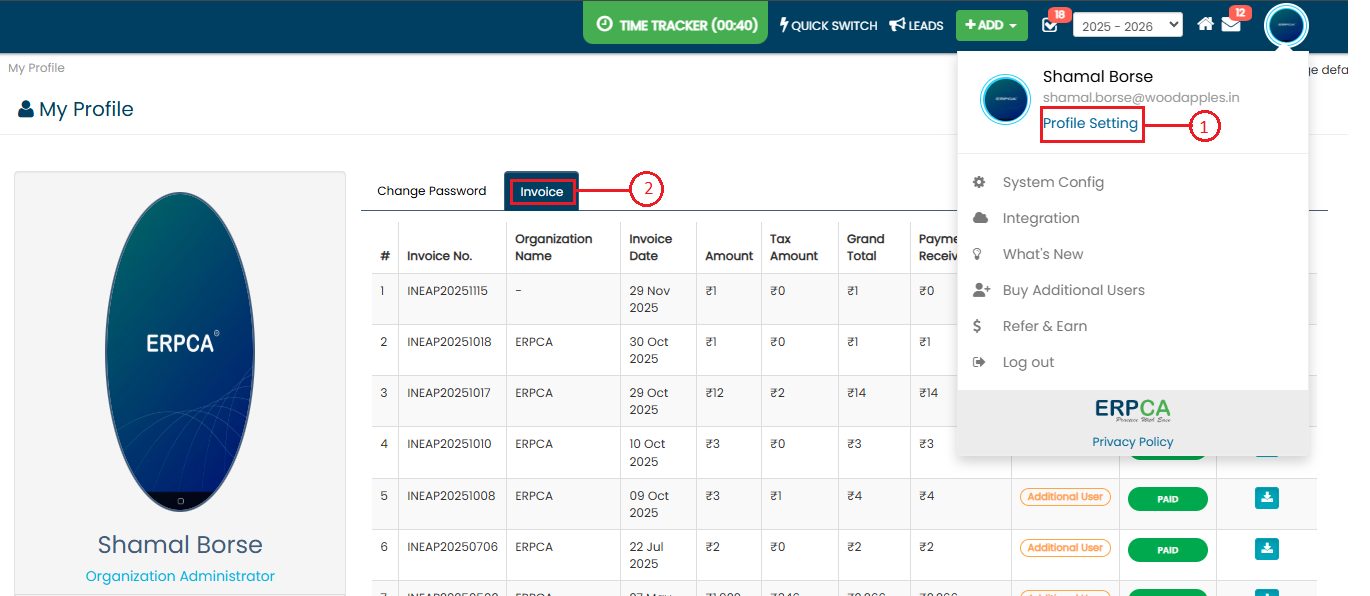
Steps to Download Invoice:
Log in through the Admin Login.
Go to Profile Settings.
Click on the Invoice tab.
Select the required invoice.
Download the invoice as needed.
This section allows Admin users to access and download all ERPCA-generated invoices for record-keeping and reference purposes.
Updated 17 Oct 2026 · View on support.erpca.com